Contents
1. Performance Reporting Framework Module
1.1 Introducing the ability to import performance indicators (CPIs)This change introduces a new Excel-based CPI (Indicator) import capability, enabling users to efficiently create indicators in bulk through a structured and a guided process. The enhancement supports configurable CPI terminology, aligns with existing system configurations (such as frequencies and additional attributes), and ensures a high level of data integrity through comprehensive validations.
By reducing manual data entry, standardising data imports, and providing visibility through validation, preview, and rollback capabilities, this feature significantly improves operational efficiency, accuracy, and user control during CPI management.
Key Features & Enhancements
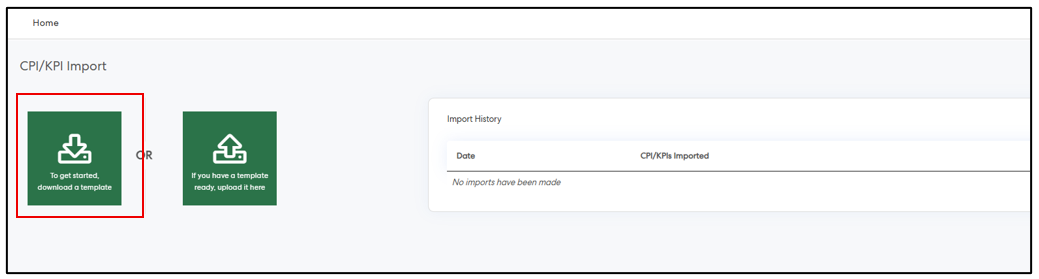
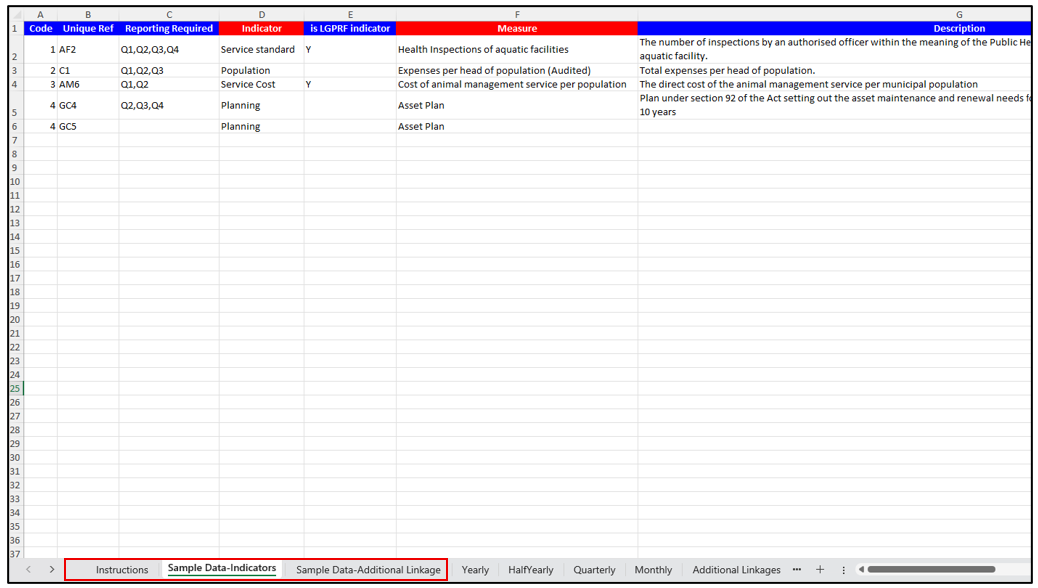
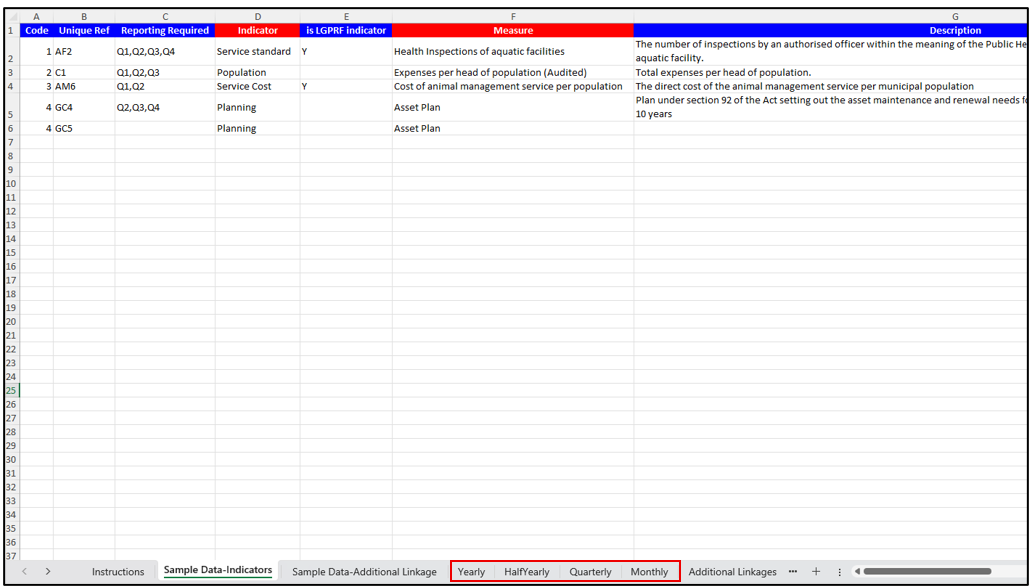
Upload Page Enhancements - Users can download a pre-configured Excel template, including instructions to guide the correct file format. Required fields are clearly highlighted, and the template supports Additional Attributes
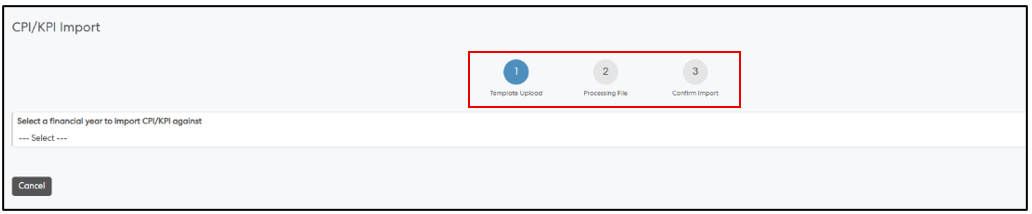
Guided 3-Step Import Process - A structured workflow has been introduced to streamline imports: Upload File → Processing → Confirm Import, ensuring clarity and control throughout the process
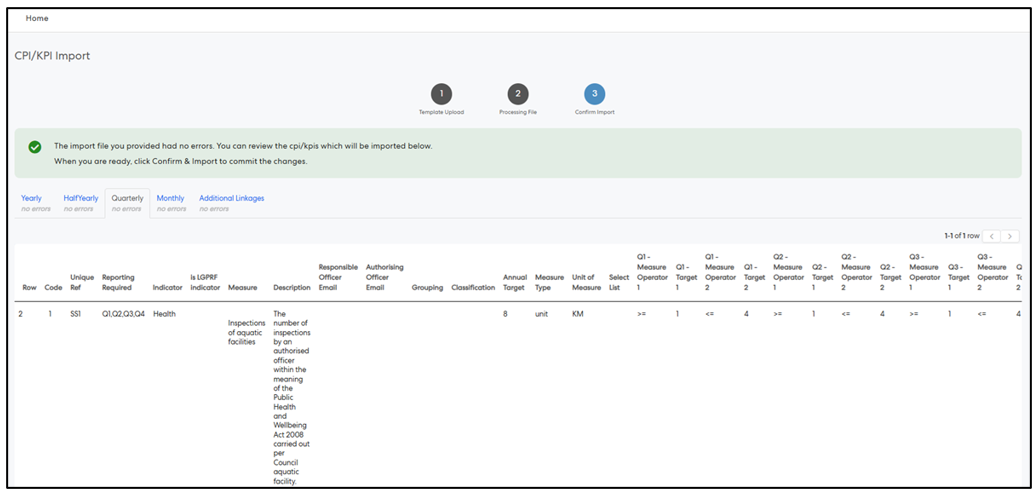
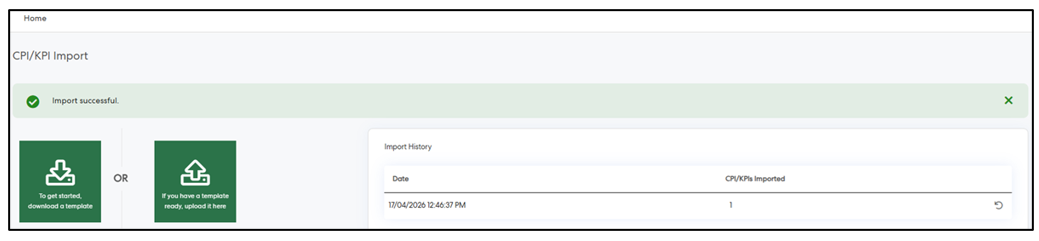
Frequency-Based Data Handling - Enables uploading data across multiple frequencies (e.g., Yearly and Quarterly) within a single file
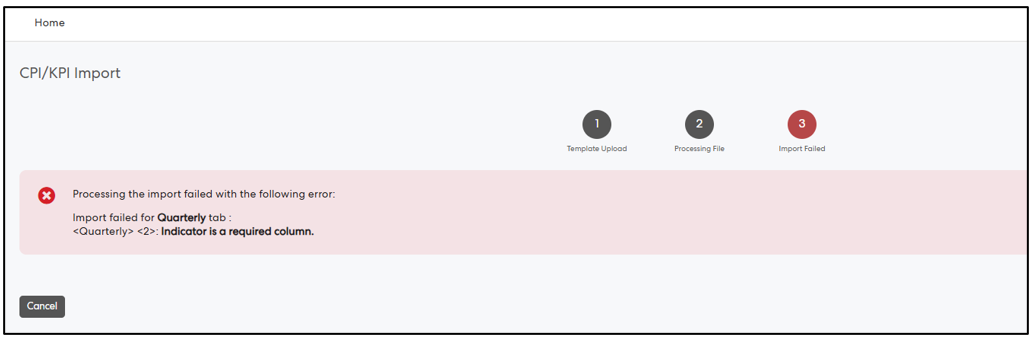
Comprehensive Validation and Error Handling - Robust validation ensures data accuracy, with clear and consolidated error messaging to help users identify and resolve issues efficiently before completing the import
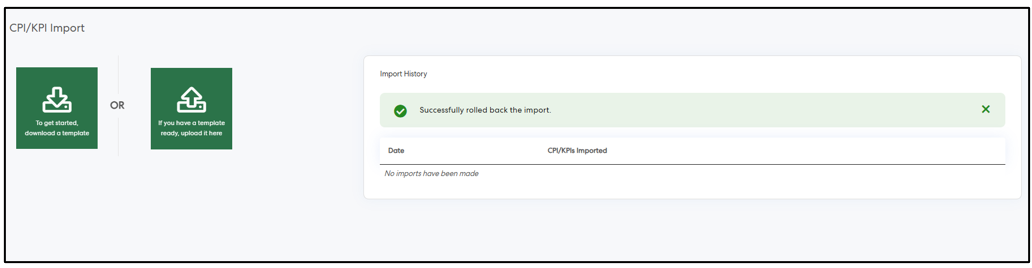
Rollback Capability - A rollback option is available, allowing users to revert changes made by imported files, ensuring greater control

2. Project Management & Control Module
2.1 Freeze Header Elements in PMC ModuleThis change introduces the ability to freeze header elements across grid views within the PMC module. It improves usability by ensuring key column headers and controls remain visible during navigation, enabling users to work more efficiently with large datasets. The feature is configurable, persists across sessions, and integrates seamlessly with existing grid functionalities.
Key Features & Enhancements
Freeze Header Elements Toggle - A new configuration option “Freeze Header Elements” has been introduced under the More Options/Configurations menu across PMC pages. Users can toggle the feature on/off


Persistent User Preference - User selection (enabled/disabled) is saved and retained across sessions (i.e. when revisiting the page) and this applies consistently across all applicable saved views
Supported Pages - The feature is available across all the key PMC module pages - My Project Executions, Project Executions, My Pre Projects, Pre Projects and Portfolio
3. Employee Performance Management Module
3.1 Goal Management EnhancementsWe’re pleased to share that new goal management features is now released
This enhancement introduces several improvements designed to enhance usability and streamline the goal management experience. To help you get started, we’ve included a short video overview that walks through the new features and demonstrates how they work in practice.
Watch the video overview
The video below is hosted in the Pulse Knowledge Base. If you have not accessed the Knowledge Base before, you will be prompted to create a login before viewing. Link to the video
What's new?
1. Goal Types
You’ll now be able to define and categorise goals to better align with your organisation’s performance framework. This includes: Categorising goals (such as personal development, team objectives, or business KPIs) for clearer structure and reporting. Applying weightings at both the goal and category level to support more meaningful performance evaluations. Defining which goal types apply to specific review periods, ensuring consistency across reviews and cycles. UI Improvements to facilitate the new features and modernise the look and feel of appraisals.
2. Due Dates for Goals
To help improve focus and accountability, goals will now support due dates: Employees can clearly see target completion dates for each goal. Optional notifications can be configured to alert reviewees when goals become overdue, helping keep progress on track throughout the review period.
What You Need to Do
We recommend: Reviewing your existing goal and review structures. Considering how goal types and weightings could align with your performance framework for the new financial year and beyond. Planning any configuration updates ahead of your next review cycle. We will migrate all current appraisals to the new structure with no impact on end users and will provide further guidance and resources to help you configure these new features for your future review periods closer to release, including a video walkthrough of new functionality. With these updates, you’ll be well positioned to start the new reporting year with a more structured and effective performance process. If you have any questions or would like to discuss how these enhancements fit into your performance strategy, please feel free to reach out to support@pulsesoftware.com.
To help you and your team feel prepared, features guides for admins, reviewers and reviewees are available on this Goal Management Knowledge Base Article. The guides walk through what's changing along with screenshots for easy reference.
Known Issues:
- Final Appraisal Score Report – The Final Appraisal Score Report is currently inaccessible on some customer sites. We are actively investigating and will provide an update once resolved.
- Demo Portal – User Creation – Creating new demo users in the Demo Portal is temporarily unavailable. Existing demo users are not affected and can continue to access the portal as normal.
4. Forms 2.0 Module
4.1 Introducing Dependent Dropdown Fields in Forms 2.0Dependent Dropdown fields capability has been introduced to the Forms module, allowing administrators to create relationships between dropdown fields within the same form. This enables dynamic filtering of dropdown options based on selections made in another field, improving form usability and helping to enforce data accuracy.
Key Capabilities
Dropdown Field Dependencies
Admins can now configure a dropdown field to behave as a dependent field, where the available options are filtered based on the value selected in a parent dropdown field.
- Only Dropdown fields are currently supported.
- Dependencies can be configured between any two dropdown fields within the same form.
Flexible Value Mapping
Admins can configure relationships between dropdown values with flexible mapping options:
- Map a single dependent value to multiple parent values
- Map multiple dependent values to a single parent value
This flexibility supports a wide range of form configuration scenarios.
Simple Dependency Configuration
Setting up dependencies is designed to be straightforward and intuitive:
1. Create or edit a dropdown field.
2. Enable the Dependent field option.
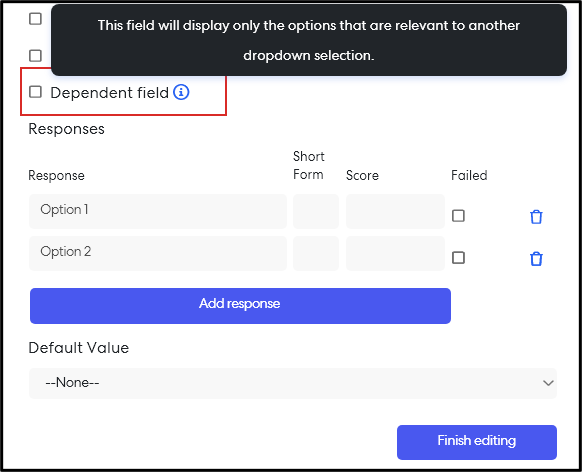
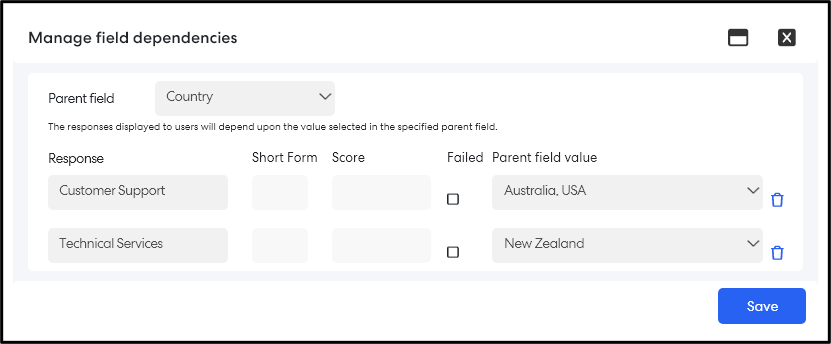
3. Click Manage field dependencies.
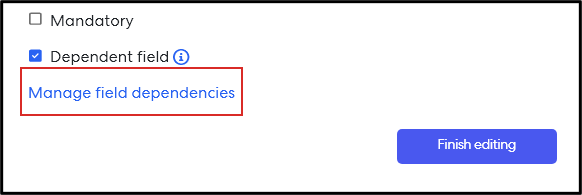
4. Select a Parent dropdown field.
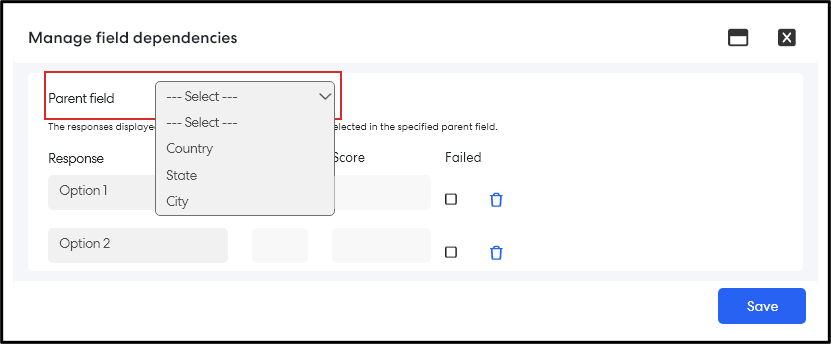
5. Define mappings between selected responses and dependent parent field values.
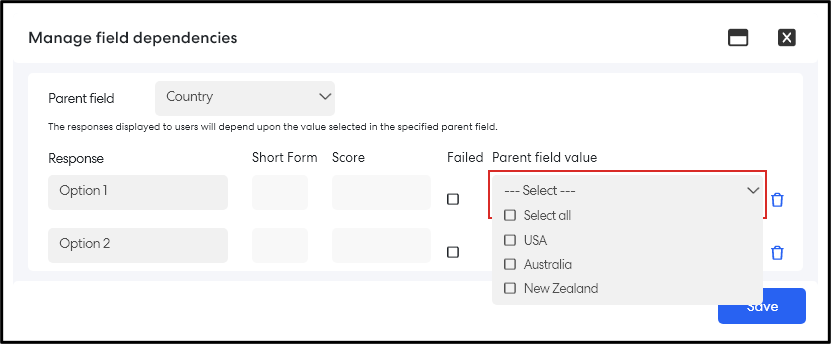
Form Submission Behaviour
- If the parent field has not been selected, the dependent dropdown will display no options.
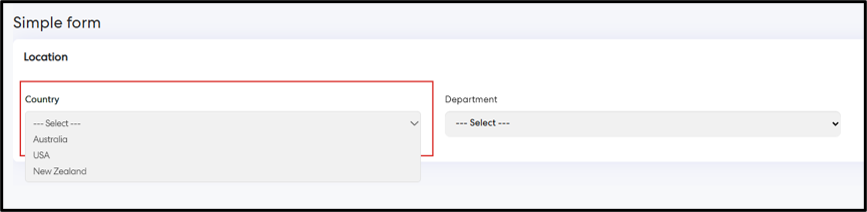
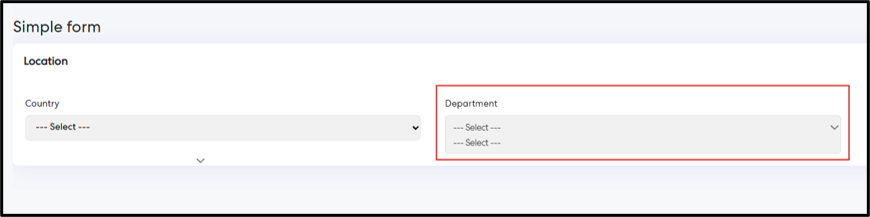
- Once a value is selected in the parent field, the dependent field will display only the mapped responses.
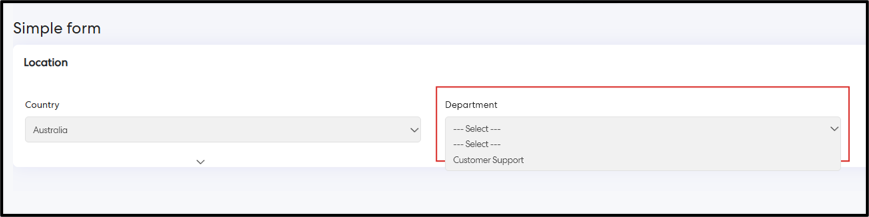
- This ensures users only see relevant and valid selections during form submission.
Behaviour When Parent Field Values Change
Deleting a Parent Field Value
If an admin attempts to delete a parent field value that is used in dependency mappings, a warning message will appear indicating that the value is currently used in a dependent field and that removing it may impact response visibility.
- Deleted parent values will no longer appear in new form submissions.
- Dependent options linked to the removed value will no longer be available for new submissions.
- Previously submitted or saved forms will continue to display the values that were selected at the time of submission.
- When editing a draft or submitted form, previously selected values will remain visible but will not appear in the dropdown list if the field is opened.
Renaming a Parent Field Value
If a parent field value is renamed, existing dependency mappings are automatically updated to reflect the new value.
- New submissions will show the updated value.
- Previously submitted forms will continue to display the original value selected during submission.
- When editing drafts or submitted forms, the original value remains visible as selected, but opening the dropdown will show the updated values.
Changing Field Types
Converting a Dropdown Field to a Dependent Field
If an existing dropdown field is converted into a dependent field:
- The previously configured responses will automatically appear in the Manage Field Dependencies configuration window.
- Admins can then map those responses to values from the selected parent field.
For existing form records, previously selected responses will continue to be displayed.
Converting a Dependent Field to a Regular Dropdown
If the Dependent field option is disabled:
- The field reverts to a standard dropdown field.
- Previously configured responses remain available as dropdown options.
- Dependency relationships are removed.
Issues resolved
HR Core
- Fixed an issue where users with edit permissions to sections of their HR Core profile were unable to update those sections on mobile devices in portrait mode.
- Fixed an issue where the Delegation count displayed in the HR Core – Delegation tab did not match the count shown in the DPR module when accessing positions via the Manage Position page. The counts are now consistent across both modules.
Corporate Planning & Reporting and Additional Hierarchies
- Fixed an issue where Organisation and Hierarchy linkages were missing after editing and saving an action within CPR, Audit, and Compliance modules. The hierarchy linkages are now retained after save and display correctly when the action is accessed, aligning with expected behaviour.
- Fixed an issue in CPR – Document Generator (Org Review) where the generated report did not align with the selected CPI reporting period. Reports now correctly reflect data for the chosen reporting period.
Delegation & Policies Register
- Fixed an issue in CPR – Document Generator (Org Review) where the generated report did not align with the selected CPI reporting period. Reports now correctly reflect data for the chosen reporting period.